How the Imaginator turns a sentence into a toy
WRITTEN TOGETHER BY JOSEPH AND DAD · TECHNICAL SECTIONS BY DAD
The Imaginator is the part of my website where you type a toy. You write one sentence, and in about a minute your toy is on the screen. You can spin it and pick its colours.
AI helpers do the magic. One draws a picture of your idea. Another turns the picture into a 3D shape, like clay, and paints it. Then the Lab's checker makes sure the shape is one piece, has no holes, and is not too thin to print.
When you press Print it, a grown-up at the Lab checks your exact toy before any plastic melts. If your colour is not loaded, we ask first. We never just swap it. Designing is free, and printing your own design is $19.
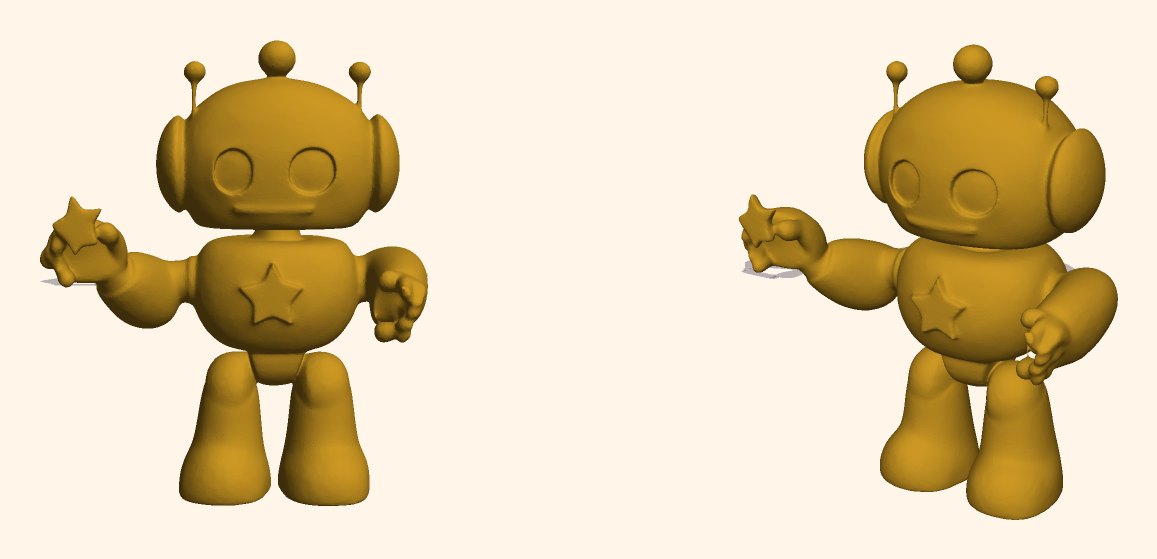
In my last note I promised you the robot holding a star, printed. Good news: it is printed! Here is how it went from one sentence to a real toy, plus a red dragon from the Imaginator's early days. Below is the long version.
THE LONG VERSION · FOR GROWN-UPS AND BIG KIDS
In note one I typed "a tiny friendly robot holding a star" into the Imaginator, got a yellow robot on the second try, pressed Print it, and promised you the finished robot in this note. It is printed. So here is everything between that sentence and the plastic, using the robot's real files, plus the dragon that was the Imaginator's first two-colour print.
One sentence, four models, one checker
Every idea goes down one line, one toy at a time, on one of the Lab's four NVIDIA DGX Spark computers. First the words are checked: a banned-word list, then an NVIDIA Nemotron model on our rack that answers SAFE or UNSAFE. If that checker is down or slow, the Imaginator says the Lab is "taking a breath" and makes nothing. It fails closed.
Then the sentence is wrapped in a fixed template and handed to SDXL-Turbo, which draws a picture in four steps. The background is cut away, Hunyuan3D-2 turns the picture into a 3D shape in eight, a second Hunyuan model paints the shape, and our code groups the paint into at most four colours, one per spool.
TOY_TEMPLATE = ("a cute {p}, toy figurine, single object, centered, "
                "plain white background, full body, 3d render style, "
                "simple chunky shapes, child-friendly, colorful")

for attempt in range(3):
    # (trimmed)
            img = t2i(prompt=full_prompt, num_inference_steps=4, guidance_scale=0.0,
                      generator=torch.manual_seed(seed + attempt * 7919)).images[0]
        img_nobg = rembg(img.convert("RGB"))
    # (trimmed)
        mesh = shape(image=img_nobg, num_inference_steps=8,
                     generator=torch.manual_seed(seed + attempt * 7919))[0]
    mesh = FloaterRemover()(mesh)
    mesh = DegenerateFaceRemover()(mesh)
    mesh = FaceReducer()(mesh, max_facenum=100000)
    # (trimmed)
    trimesh.repair.fix_normals(tm)
    tm.fill_holes()
    tm = smooth_mesh(tm)
    issues = quality_check(tm)
    if not issues:
        break
Hunyuan3D-2 was the best shape model we found that we could run ourselves, and it starts from a picture, not words. So one model imagines and another sculpts. The template is the house style: one chunky object, full body, plain background, which a shape model and a printer both like. Wording still matters: try one in note one put the star on the robot's chest, and the fix was a better sentence, not better code.
The checks that stop a bad idea before it prints
A picture can be anything. A printer needs a solid. The checker rejects a shape in more than one piece, one that is not watertight, or one more than eight times longer than it is thin, and starts again with a new seed, up to three tries. Then it measures the thinnest walls. Our nozzle lays a line 0.4 mm wide, so the floor is 0.8 mm, two lines; below that, the whole toy is made bigger, up to 1.6 times. Last, it scales the toy to 80 mm on its longest side, the website's default.
def quality_check(tm):
    """Returns list of fatal issues (worth a regenerate)."""
    issues = []
    if tm.body_count != 1:
        issues.append(f"{tm.body_count} disconnected bodies")
    if not tm.is_watertight:
        issues.append("not watertight")
    ext = sorted(tm.extents)
    if ext[0] > 0 and ext[2] / ext[0] > 8:
        issues.append(f"extreme proportions {ext[2]/ext[0]:.1f}:1")
    return issues

# sturdiness: bump size until thin details reach ~0.8mm walls
scale0 = size_mm / float(max(tm.extents))
p05 = measure_thickness_mm(tm, scale0)
if p05 is not None and p05 < 0.8:
    bumped = min(size_mm * min(0.8 / max(p05, 0.2), 1.6), 220.0)
Colour costs time too: every layer where the colour changes, the printer stops, purges and wipes. Above 80 estimated changes, the code merges the two closest colours until the toy fits, and the screen says "colors simplified so it prints beautifully".

What you approve is exactly what prints
Every finished toy gets a revision: a numbered, frozen record of its size and colours, a SHA-256 fingerprint of the print file, and the models that made it. Tap a new colour and you make a new revision. Pressing Print it, with a grown-up's email, approves one revision number and nothing else; pressing it twice just gets "Already in the Lab's print line from before!" Each toy also has a secret handle, given only to the browser that made it, so nobody else can recolour or print it.
The robot's revision 1 says 65.5 by 80 by 36.6 millimetres, one colour, a gold (#CD9924). On the day we wrote this its print file still matched that fingerprint, and we checked it ourselves: watertight, one piece, 100,000 triangles.
# A colour further than this (CIE76 delta-E in Lab space) from every loaded spool is
# NOT the approved colour. 12 is about "same colour, different brand"; beyond it the
# job is HELD and the grown-up is offered the nearest loaded spool as a new revision.
DELTA_E_SAME = 12.0

    if jst.get("approved_revision") != jst.get("revision") and not args.force_revision:
        sys.exit(f"job {job}: colours changed after approval (approved {jst.get('approved_revision')}, current {jst.get('revision')}) - ask the grown-up to press print again")
The colour rule is my favourite. A colour further than 12 from every loaded spool (a distance measured roughly the way the eye sees colour) holds the job, and the grown-up is offered the nearest loaded colour to say yes or no to.
| Words check | banned-word list on the website, then an NVIDIA Nemotron model on our rack; 8-second limit; fails closed |
| Picture | SDXL-Turbo (Stability AI), half precision, 4 steps, no guidance |
| Shape | Hunyuan3D-2 turbo shape model (Tencent), 8 steps |
| Colour | Hunyuan3D-2 paint model, grouped into at most 4 colours; merged above 80 estimated colour changes |
| Checks | one piece · watertight · no more than 8:1 · walls at least 0.8 mm, else up to 1.6x bigger · 3 tries |
| Print file | STL, at most 100,000 triangles, 80 mm longest side by default (20 to 220 mm allowed) |
| Where | one DGX Spark (NVIDIA GB10, 128 GB memory shared by CPU and GPU) |
| Limits | 3 new toys per device per 10 minutes, 10 in the queue |
As of the day we wrote this (Sep 26, 2026), from the service's code and its own record. The GB10 and memory figures are NVIDIA's.
SDXL-Turbo is Stability AI's, under its Community License: commercial use is free for a business under US $1,000,000 a year in revenue that registers, which our licences page records. Past that line we would need Stability AI's paid licence. Hunyuan3D-2 is Tencent's, under a licence that excludes the European Union, the United Kingdom and South Korea, so the website makes no new toys for visitors there; the shop still works. And the Lab never trains on visitor or child interactions.
Your sentence goes from our website host (Vercel) through a rented relay server that stores nothing, to the Lab’s own computers, run by Thinking Humans, my other company. Pictures and shapes are made and stored there, not in someone else’s cloud. Our website analytics does not get what you typed. An uploaded photo is checked for people, stays in memory only until its picture is drawn, and is never written to disk. The event log keeps a hash salted with the day's date, not an internet address. A toy's files are deleted after 7 days, after 30 if a print was requested, and kept while a printed toy is shown or sold. The full list is on our Data & AI page.
How we set it up
- One container on a DGX Spark with PyTorch, diffusers, trimesh and Tencent's Hunyuan3D-2 code; the three models load once at start.
- One lock on the graphics chip and a first-in, first-out queue, saved to disk so a restart carries on.
- The website never talks to the Spark directly: its own function checks the words, then goes through our relay to the rack with a key.
- One small database file records every state change, revision and print request.
- A separate tool on Dad's side fetches the approved revision, maps colours to loaded spools, slices, and refuses anything else.
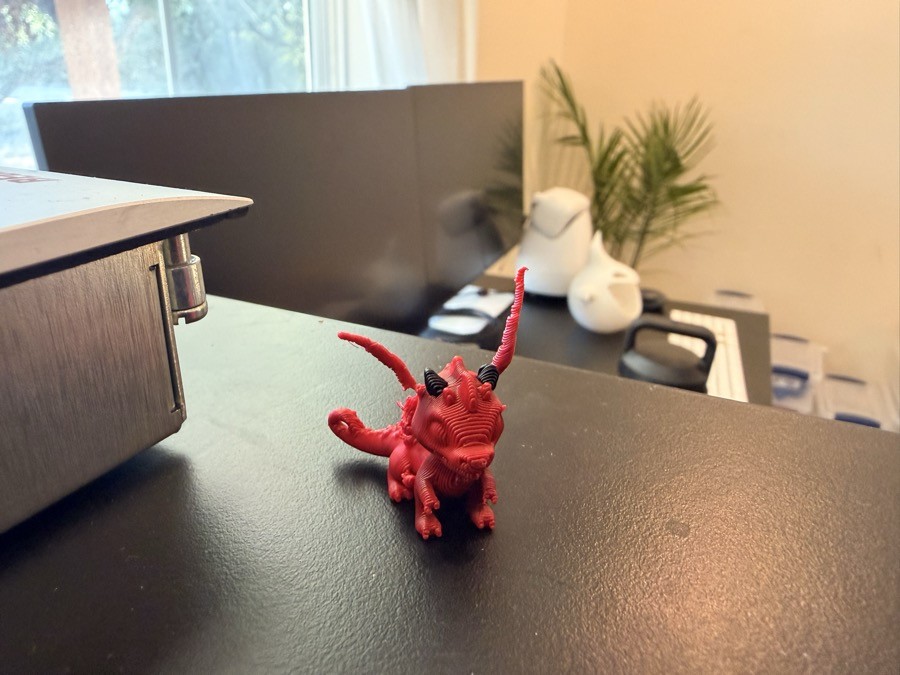
That dragon, from "a red dragon with big bright orange eyes", was the Imaginator's first two-colour toy (the design is machine-generated; the plastic is ours), printed on Aug 25. The first good print took three tries.
Things that went wrong
- The robot from note one took longer than I promised. Its request was approved on Sep 11 and then waited for someone to send it to a printer. This note, due Sep 24, is late too.
- The dragon's first print clumped on the nozzle and printed nothing: we had skipped flow calibration to save four minutes. The second was cancelled: no supports, and the wings would have drooped.
- The first website toy we printed, a puppy with a blue hat, had four colours scattered all over it: the slicer quoted 312 colour changes and 8 hours 39 minutes. In one colour it quoted 2 hours 52, so that is how we printed it, and why the code now merges colours.
- On Sep 6 we switched on the secret handles and every toy's 3D view went blank, because the viewer loads its file without sending the handle. The first version of the fix had a syntax error that broke the whole page.
- Writing this, we found two stale things. The Imaginator has not seen which plastic is loaded since Sep 12, so it shows the Lab's usual colours. And the code version stamped into every revision has not changed since Sep 6, though the code changed on Sep 17. The model names are right; the code version is not.
What we would tell you
Let a picture model imagine and a shape model sculpt, but never let either decide what is printable: that is your own code's job, with rules anyone can read. Freeze what the customer approved under a number and a fingerprint, and make the printer side refuse anything else. And hold a job rather than quietly swap a colour. A kid notices.
Texas Toy Lab, a 3D-printed toy business run by 8-year-old Joseph in Texas, runs its own text-to-toy service, the Imaginator, on an NVIDIA DGX Spark at the Lab. A sentence becomes a picture (Stability AI's SDXL-Turbo), then a 3D shape (Tencent's Hunyuan3D-2). The Lab's own code checks the shape is printable, and a grown-up approves the exact version before anything prints.
Mentioned in this note: NVIDIA, Stability AI and Tencent Hunyuan. None of them is involved in the Lab. The dragon photo is free to use with the credit "Texas Toy Lab". Press page: texastoylab.com/press, kit: the press kit (.zip); contact joseph@texastoylab.com (Dad answers).
- NVIDIA DGX Spark (the computer the Imaginator runs on)
- SDXL-Turbo model card and its Stability AI Community License
- Hunyuan3D-2 model card and its Tencent Hunyuan 3D 2.0 Community License
- NVIDIA Nemotron 3.5 Lightning 30B-A3B model card (the words check)
- Our licences page (every model and library we use, with the required notices)
Next technical note: the second opinion, how we use a Grok Bot to argue with our own plan.
Howdy. Go type a toy.
Joseph ★ (and Dad, for the boring parts)